
The Uncomfortable Truth About Most Agency GHL Setups
You spent time migrating to GoHighLevel. You paid for the subscription. You may have even watched hours of tutorials.
But here’s the question that matters: are the right automations actually running?
Because here’s what we see inside agencies every single week at GHL Protocol — and it’s the same pattern over and over again. Agency owners go live on GHL, set up the basics, sign a client, and then realize halfway through the engagement that leads are still falling through the cracks. Follow-up is still inconsistent. The pipeline is full of contacts nobody has touched in 30 days. And the client is starting to ask uncomfortable questions.
The problem isn’t GoHighLevel. The problem is that most agencies set up GHL as a tool instead of a system.
There are seven automations that separate the agencies running lean, profitable operations from the ones constantly fighting fires. These aren’t advanced workflows for GHL power users. They are the non-negotiables — the foundation every agency should have running before they take on another client.
Build these seven. Then go sign the next client with confidence.
Why Automations Are the Real Product You’re Selling
Before we get into the seven, let’s address something most agencies get wrong about their own value proposition.
Your clients aren’t paying you for strategy decks and monthly reports. They’re paying you for one thing: results that happen consistently, whether you’re in the office or not.
That’s what automation actually delivers.
Responding to a lead within five minutes increases conversion rates by up to 100 times compared to a 30-minute delay. Read that again. Not 10%. Not double. One hundred times. And yet the average B2B lead response time is a staggering 42 hours — nearly two full business days.
Your clients’ competitors are mostly asleep on this. More than half of businesses wait over five full days to reach out to new leads. At that point, the lead has not only lost interest but likely purchased from a competitor.
When you build the right GHL automations, you don’t just improve your client’s results. You make the agency’s value undeniable and visible — tracked, measured, and reported every single month.
That’s how you build retention. That’s how you build a $30k/month agency on a lean team.
Here are the seven automations that make it happen.
Automation #1: Speed-to-Lead — The Instant Response Workflow
What it does: Sends an automatic SMS (and optionally an email) to every new lead within 60 seconds of them opting in — regardless of where the lead came from.
Why it’s non-negotiable:
This is the single most impactful automation in GHL, and it’s also the most underused. Leads reached within five minutes are 21 times more likely to turn into customers compared to those contacted after half an hour. When a lead reaches out, they are actively thinking about a solution — they want answers now, not hours later.
Following up with your lead in the first minute can lead to a 391% increase in conversions compared to waiting just a few minutes longer
Yet most agencies are still relying on a human to see a notification, open the CRM, find the lead, and manually send a message. By the time that happens — if it happens — the lead has already moved on.
How to build it in GHL:
- Trigger: Contact created or form submitted
- Action 1: Send immediate SMS — “Hi [First Name]! Thanks for reaching out about [service]. I’m looking into this for you right now — is this a good time to connect?” (personalize per client niche)
- Action 2: Send follow-up email simultaneously with more context and a booking link
- Action 3: Create a pipeline opportunity and assign to the appropriate stage
- Action 4: Notify the assigned rep via GHL task or internal notification
Pro tip from GHL Protocol: Personalize the first SMS with the lead’s first name and a reference to the specific offer or service they inquired about. Generic messages get ignored. Personalized ones get responses. GHL’s custom values and merge fields make this easy to implement at scale across multiple client accounts.
Automation #2: Multi-Touch Lead Nurture Sequence
What it does: Runs a structured 14 to 21-day follow-up sequence for every lead that doesn’t book immediately — combining email, SMS, and voicemail drops across multiple touchpoints.
Why it’s non-negotiable:
Most agencies follow up once or twice and give up. But the data tells a very different story about when deals actually close.
Over 30% of leads are never contacted at all. Forbes research found that sales reps often give up too soon, making 1.3 call attempts on average before moving on and missing critical conversion opportunities.
Meanwhile, most purchasing decisions happen between the 5th and 12th touchpoint. The agencies that win aren’t necessarily the ones with the best offer — they’re the ones that stay in the conversation long enough for the lead to make a decision.
How to build it in GHL:
- Day 0: Instant SMS (Automation #1 handles this)
- Day 1: Follow-up email with value content (case study, FAQ, or testimonial)
- Day 2: SMS with a different angle or question
- Day 3: Voicemail drop — keep it personal and brief, under 30 seconds
- Day 5: Email with social proof or a results story
- Day 7: SMS with a direct booking link and a soft deadline
- Day 10: Email addressing the most common objection in the niche
- Day 14: Final SMS — “I’ll leave the door open. Reach out whenever the timing is right.”
Pro tip from GHL Protocol: Build exit conditions into every sequence. If the lead replies, books an appointment, or opts out — the sequence stops immediately. Nothing kills trust faster than continuing to follow up with someone who already said yes. Use GHL’s workflow conditions and goal events to handle this cleanly.
Automation #3: Appointment Reminder & No-Show Recovery
What it does: Sends automated reminders before every scheduled appointment and triggers a re-booking sequence immediately if a lead no-shows.
Why it’s non-negotiable:
No-shows are one of the most expensive problems in any service business. A missed appointment isn’t just lost time — it’s a lead that was warm enough to book and then went cold before the conversation ever started.
The good news is that most no-shows are preventable with proper reminder sequencing. And the ones that do no-show aren’t necessarily lost — they just need an immediate reason to reschedule.
How to build it in GHL:
Reminder sequence:
- Booking confirmation: Immediate email + SMS upon booking
- 24 hours before: Email reminder with a calendar link and what to expect
- 1 hour before: SMS reminder — “Hey [First Name], just a heads up — your call with [rep name] is in 1 hour. Here’s the link: [link]”
- 15 minutes before: Final SMS nudge (optional, but effective for high-value appointments)
No-show recovery:
- Trigger: Appointment status marked as “No Show” in GHL
- Wait: 30 minutes
- SMS: “Hey [First Name], looks like we missed each other. No worries — want to grab a quick 15 minutes this week? Here’s my booking link: [link]”
- 24 hours later: Follow-up email
- 3 days later: Re-enter into the nurture sequence
Pro tip from GHL Protocol: Set up a dedicated “No Show” pipeline stage and automate the re-booking sequence from there. This keeps your pipeline clean and ensures no-shows never just disappear — they always have a next action.
Automation #4: Missed Call Text-Back
What it does: Automatically sends an SMS to anyone who calls a client’s business number and doesn’t get answered — within 60 seconds of the missed call.
Why it’s non-negotiable:
This is the most underrated feature in all of GoHighLevel. It takes five minutes to activate and immediately starts recovering revenue that would otherwise walk straight to a competitor.
Think about what happens right now for most local businesses when they miss a call. The caller hangs up, maybe tries once more, then Googles the next option on the list. That’s it. The lead is gone and they never know it happened.
With GHL’s missed call text-back, the moment a call is missed, an automatic message fires: “Hi! Sorry we missed your call. We’ll get back to you shortly — or you can book a time here: [link].”
The lead gets an immediate response. They feel acknowledged. The business stays in the conversation. Agencies that automate their follow-up consistently outperform those that don’t, often by 40% or more.
How to build it in GHL:
- Enable LC Phone or Twilio number in GHL settings
- Go to: Settings → Phone Numbers → Missed Call Text-Back
- Toggle on for each client sub-account
- Customize the message to match the client’s voice and include a booking link
- Set up a pipeline trigger so every text-back response creates a new opportunity automatically
Pro tip from GHL Protocol: Set up the missed call text-back for every single client as part of your standard onboarding checklist. It is always on, always running, and generates results without any ongoing management. We’ve seen this single automation recover thousands in revenue in the first 30 days for local service clients.
Automation #5: Review Request Sequence
What it does: Automatically requests a Google (or Facebook) review from every client after a service is completed — using a timed SMS and email follow-up sequence.
Why it’s non-negotiable:
Reviews are currency for local businesses. More reviews means better Google rankings, more trust from potential customers, and more inbound calls — without spending a single additional dollar on advertising.
The problem is that most business owners know they should be asking for reviews, but the manual effort of doing it consistently after every job is simply never prioritized. It gets forgotten. Which is exactly why automating it inside GHL is one of the fastest wins you can deliver for any client.
How to build it in GHL:
- Trigger: Pipeline stage moved to “Job Complete” or “Service Delivered”
- Wait: 2 hours (enough time for the experience to settle in)
- Action: SMS — “Hi [First Name]! It was great working with you. If you have 60 seconds, we’d really appreciate a Google review — it helps us a lot: [direct review link]”
- Wait: 48 hours (if no review detected)
- Action: Follow-up email — warm, not pushy, reiterating the request
- Wait: 5 days (if still no review)
- Action: Final gentle SMS nudge — then stop
Pro tip from GHL Protocol: Use GHL’s reputation management dashboard to monitor incoming reviews across all client accounts from one central view. Set up an alert so you’re notified immediately if a client receives a 1 or 2-star review — allowing you to respond quickly before it damages their online reputation.
Automation #6: Dead Lead Reactivation Campaign
What it does: Automatically re-engages leads that have gone cold — contacts who entered the pipeline but never converted, sitting dormant for 30, 60, or 90+ days.
Why it’s non-negotiable:
Every agency has a graveyard of cold leads that nobody is working. These are contacts who showed genuine interest at some point — they opted in, requested information, or even had a conversation — but for whatever reason, never converted.
Most agencies write them off. That’s a mistake. Between one-third and half of all sales are won simply by being the first to respond — while competitors are still deciding who should handle the lead, the fast responder is already building rapport. The same logic applies to reactivation: most of your competitors are ignoring these leads entirely. One well-timed message can bring a significant percentage back into the conversation.
How to build it in GHL:
- Create a smart list of all leads with no activity in the past 30+ days
- Tag them with a “Re-engagement” tag to trigger the workflow
- Message 1 (Day 0): “Hey [First Name], I know it’s been a while — has anything changed with [the problem they originally had]?”
- Message 2 (Day 3): Share a relevant case study or result via email
- Message 3 (Day 6): “I have a few openings this month — would it make sense to reconnect for a quick call?”
- Message 4 (Day 10): Send a useful tip, resource, or insight (value before the ask)
- Message 5 (Day 14): “I’ll leave the door open — reach out whenever the timing works for you.”
Pro tip from GHL Protocol: Run this campaign quarterly on every client account. Each quarter, filter leads that haven’t engaged in 90+ days and run them through the reactivation sequence. We’ve consistently seen 10–20% of dead leads respond and a meaningful percentage convert into clients — generating revenue from contacts the client had completely given up on.
Automation #7: Post-Service Referral Request
What it does: Automatically asks satisfied clients for a referral 14 to 30 days after their service or after leaving a positive review — creating a passive, compounding source of zero-cost new leads.
Why it’s non-negotiable:
Referrals are the highest-converting lead source for almost every service business. A referred lead comes pre-loaded with trust — they already believe in the business because someone they know vouched for it. They close faster, negotiate less, and stay longer.
The problem is that asking for referrals manually is inconsistent at best. A good experience happens, a few days pass, and the moment is gone. GHL eliminates this entirely.
How to build it in GHL:
- Trigger option 1: Pipeline stage moved to “Job Complete” — wait 14 days, then fire
- Trigger option 2: Positive review received — fire 48 hours after a 4 or 5-star review
- Action: SMS — “Hey [First Name]! We really enjoyed working with you. Quick question — do you know anyone else who could benefit from [service]? If so, I’d love an introduction. We always take great care of referrals.”
- If they respond with a name or contact: assign a task to the team to follow up personally
- Optional: Build a formal referral landing page in GHL where clients can submit referral details directly
Pro tip from GHL Protocol: For clients with a larger customer base, build a full referral program in GHL — a branded landing page, a unique referral link per customer, and an automated reward trigger when a referral converts. This turns casual word-of-mouth into a structured, measurable lead channel that generates new business at zero ad spend.
Putting It All Together: The Agency Standard Checklist
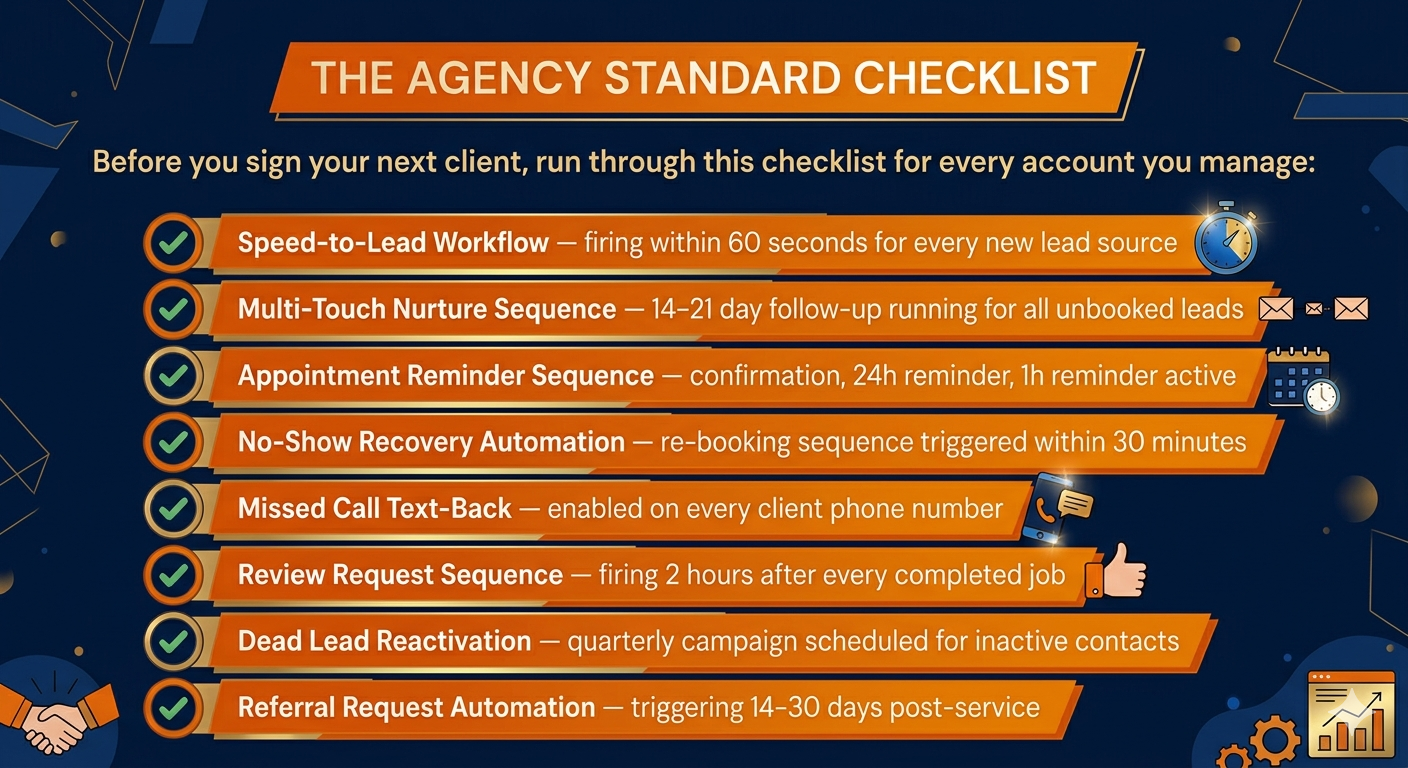
Before you sign your next client, run through this checklist for every account you manage:
✅ Speed-to-Lead Workflow — firing within 60 seconds for every new lead source
✅ Multi-Touch Nurture Sequence — 14–21 day follow-up running for all unbooked leads
✅ Appointment Reminder Sequence — confirmation, 24h reminder, 1h reminder active
✅ No-Show Recovery Automation — re-booking sequence triggered within 30 minutes
✅ Missed Call Text-Back — enabled on every client phone number
✅ Review Request Sequence — firing 2 hours after every completed job
✅ Dead Lead Reactivation — quarterly campaign scheduled for inactive contacts
✅ Referral Request Automation — triggering 14–30 days post-service
The agencies that win aren’t the ones with the flashiest ads or the biggest budgets. They’re the ones that never let a lead slip through the cracks — the ones that respond in seconds, follow up consistently, and stay top-of-mind without relying on manual effort.
These eight checkboxes — seven automations plus the no-show recovery that complements Automation #3 — are what that looks like in practice.
The Hidden Cost of Not Having These Running
Here’s a calculation worth doing for your own agency and your clients.
Take the average number of leads coming in per month. Now apply the industry average contact rate of manually-managed businesses — roughly 27%, meaning just 27% of leads get contacted at all.
Now imagine what happens when you flip that to 80%+ contact rates through automation. The same lead volume. The same ad spend. Dramatically different revenue.
That’s the business case for GHL automations. Not as a nice-to-have, but as the core infrastructure every client account should be running on from day one.
Why GHL Protocol Builds These for Agencies — Not Instead of Them
At GHL Protocol, we work with agency owners who are great at strategy, client relationships, and growing their business — but don’t want to spend 20 hours per client getting these workflows configured, tested, and optimized.
GoHighLevel is designed with agencies in mind, offering robust client management tools, automated onboarding, and scalable marketing features — but setup matters. Don’t expect it to work out of the box.
That’s exactly why we exist. We build these systems in 24–72 hours, with full documentation, clean tagging architecture, and tested exit conditions — so agencies can onboard faster, deliver better results, and retain clients longer.
If you’re an agency owner who wants these seven automations built and running for your clients — without spending weeks figuring it out — book a strategy call at ghlprotocol.com.
We’ll audit your current setup, identify the gaps, and build exactly what your clients need to see real results.
Frequently Asked Questions
How long does it take to build these seven automations in GHL? If you know the platform well, each automation takes between 30 minutes to 2 hours to build properly — including testing. The full set can realistically be completed in one focused day of work. At GHL Protocol, we typically deliver complete automation builds within 24–72 hours.
Do I need coding skills to build GHL automations? No. GoHighLevel is a visual workflow builder. If you can use drag-and-drop and understand basic “if this, then that” logic, you can build these automations. The learning curve is figuring out the platform, not writing code.
Can I use these automations across multiple client accounts? Yes — and this is one of GHL’s greatest strengths for agencies. Build the automation once, save it as part of a snapshot, and deploy it to every new client sub-account in minutes. This is exactly how agencies scale to 20+ clients without proportionally growing their team.
What if a lead replies to an automated message? Will they keep getting automated follow-ups? Only if you set it up incorrectly. Every automation should have clear exit conditions — if a lead replies, books, opts out, or is marked as won or lost, they should exit the sequence immediately. Proper tagging and goal events inside GHL handle this automatically when configured correctly.
How do I measure whether these automations are actually working? Track these metrics inside GHL for each automation: contact rate (what percentage of new leads are being reached), booking rate (what percentage of contacted leads book a call), no-show rate (what percentage of bookings are kept), review velocity (new reviews per month), and reactivation response rate. Build a simple reporting dashboard in GHL and review it monthly with clients.